

Available on Premium and above plans.
The integration is one-directional: dbt → Cube. Cube never writes back to your
dbt project. dbt stays the source of truth for how tables are transformed; Cube
serves those models to BI tools, APIs, and AI agents.
How it works
When a pull runs — whether triggered manually, from CI, or by a repository push — Cube spins up a short-lived, isolated sandbox and:- Clones your dbt repository (a shallow clone of the branch you selected).
- Installs your project’s dependencies (
dbt deps). - Parses the project (
dbt parse) to produce dbt’smanifest.json— the structured description of every model, column, test, and constraint. - Converts each dbt model into a cube definition (one
.ymlfile per model). - Commits the generated files to a branch for review, then tears the sandbox down.
dbt parse, not dbt run or dbt compile, so it reads your project’s structure
without ever querying your warehouse. dbt pull generates cube definitions; it assumes
the underlying tables were already built by your own production dbt run.
Prerequisites
- A supported data warehouse. dbt pull supports Snowflake, Amazon Redshift, PostgreSQL, Google BigQuery, Databricks, and Amazon Athena. If your deployment uses any other database type, the pull dialog will tell you it’s unsupported.
- A Git repository containing your dbt project, reachable over HTTPS or SSH. GitHub, GitLab, Bitbucket, Azure DevOps, and self-hosted Git servers all work.
- Read access to that repository — either a personal access token (PAT) for HTTPS, or the ability to register a read-only deploy key for SSH.
- For the generated cubes to return data, the dbt models must already be built into
your warehouse (via your normal production
dbt run) in the schema you configure below. dbt pull generates cube definitions that point atschema.<model>; it does not create the underlying tables.
Connect your dbt repository
The dbt connection is configured on your deployment’s default data source.1
Open the data source settings
Go to Settings → Data Sources and edit the default data source.
Expand the dbt project section.
2
Fill in the connection fields
3
Choose an authentication method
Two authentication methods are supported: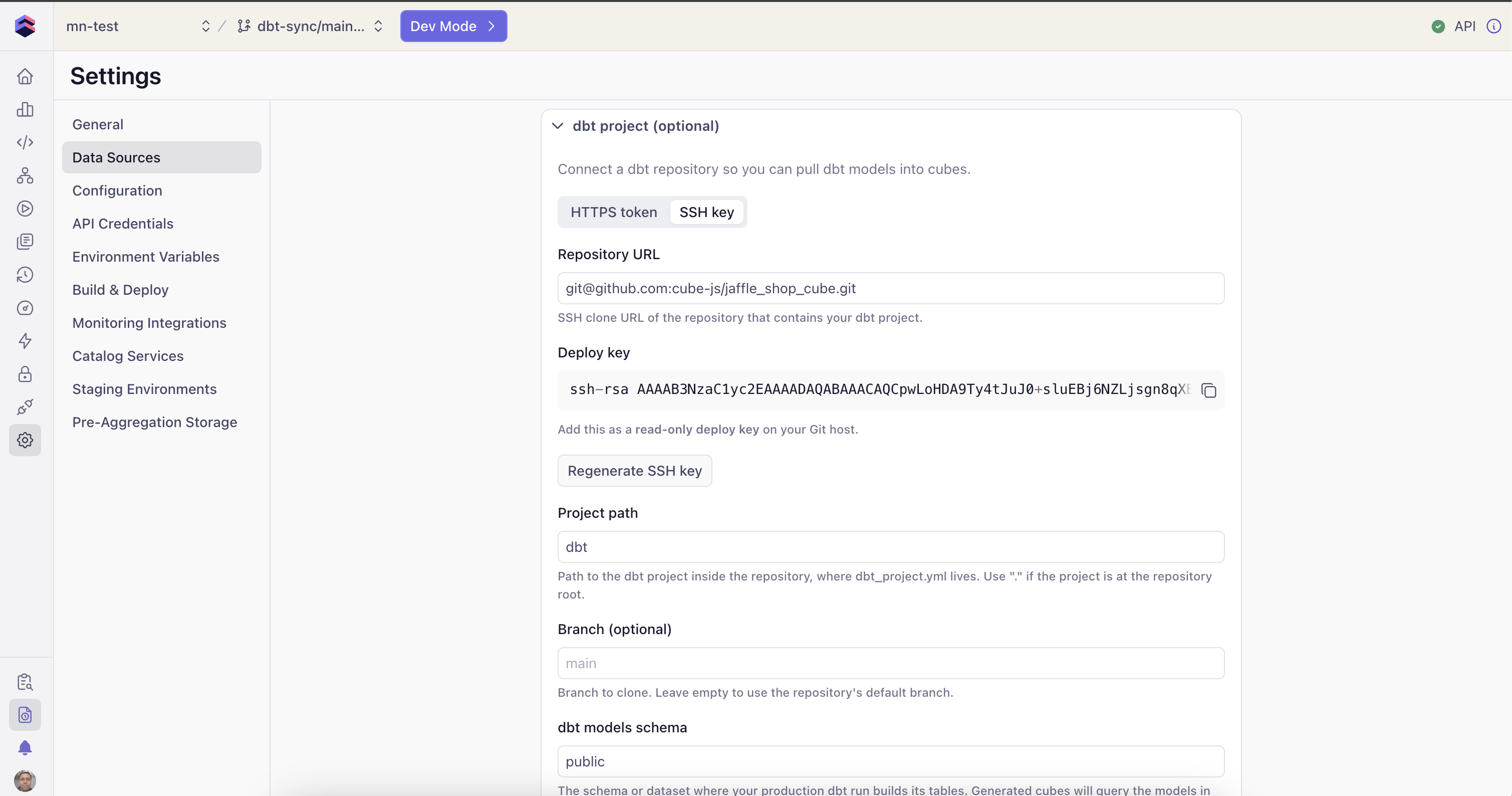
- HTTPS + personal access token — paste a PAT with read access to the repository. Leave it unchanged on later edits to reuse the existing token.
- SSH deploy key — Cube generates a key pair for you and shows you the public key to register as a read-only deploy key on your Git host. The private key is generated and stored server-side and never leaves Cube.
4
Test the connection
Click Test connection. Cube checks that the repository is reachable with your
URL and credentials and reports the result:
- “Repository is reachable” — you’re good to save.
- An error message identifying the problem (invalid/expired token, repository not found, host unreachable, not a Git URL, etc.).
5
Save
Click Save dbt settings.
Configure pull settings
Pull options are saved on the integration itself, so every pull — manual or automated — uses the same configuration:Run a pull manually
1
Enter development mode
Open the deployment’s data model page (the IDE) and enter development mode.
The dbt integration is disabled outside dev mode — a manual pull lands on your dev
branch, never directly on production.
2
Open the pull dialog
Open the Integrations menu → dbt → Pull. The dialog shows what will be
pulled using your saved settings.
3
Start the pull
Click Start Pull. A progress toast tracks the pull and ends with
“dbt pull completed (N cubes)”. The generated files appear in your file tree
under the output path, on your development branch.
Keep Cube in sync automatically
Automated syncs run the same pipeline as a manual pull, but instead of committing to your working branch they create a fresh review branch — so a person can approve the update before it reaches the live data model.Trigger from your CI/CD pipeline
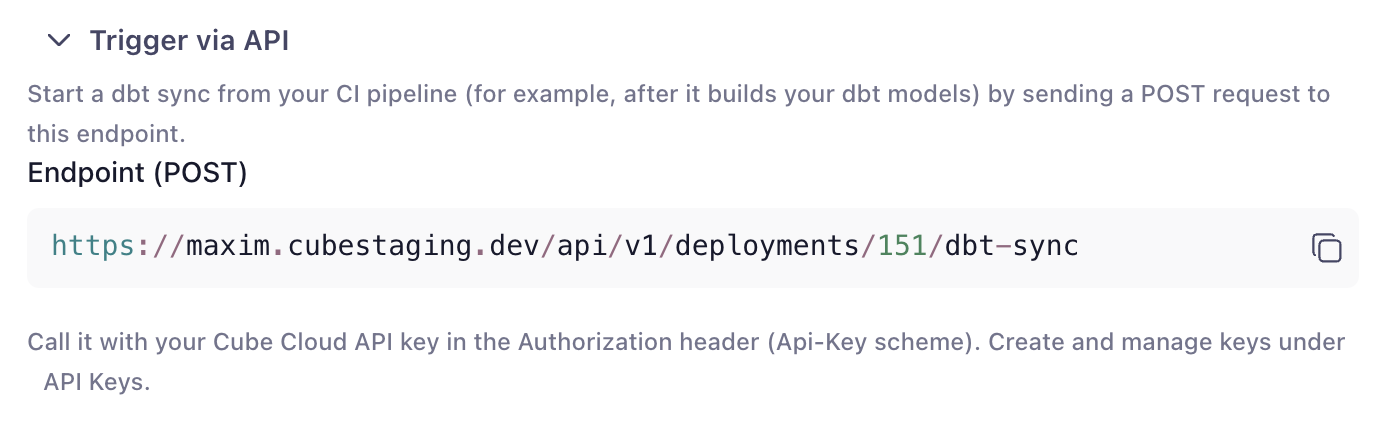
Cube exposes a REST endpoint you can call at the end of your dbt deployment pipeline, right afterdbt run. As soon as your warehouse tables are rebuilt, your pipeline
tells Cube to regenerate the matching cubes. The exact endpoint URL for your
deployment is shown in the dbt settings card, ready to drop into a CI step.
Trigger on every push
Register a webhook on your dbt repository so Cube syncs automatically whenever the tracked branch is updated. In the settings card, generate a signing secret and copy the callback URL into your Git host’s webhook settings. Pushes are verified by signature, de-duplicated (redeliveries and no-op ref changes are ignored), and scoped to the branch you’re syncing.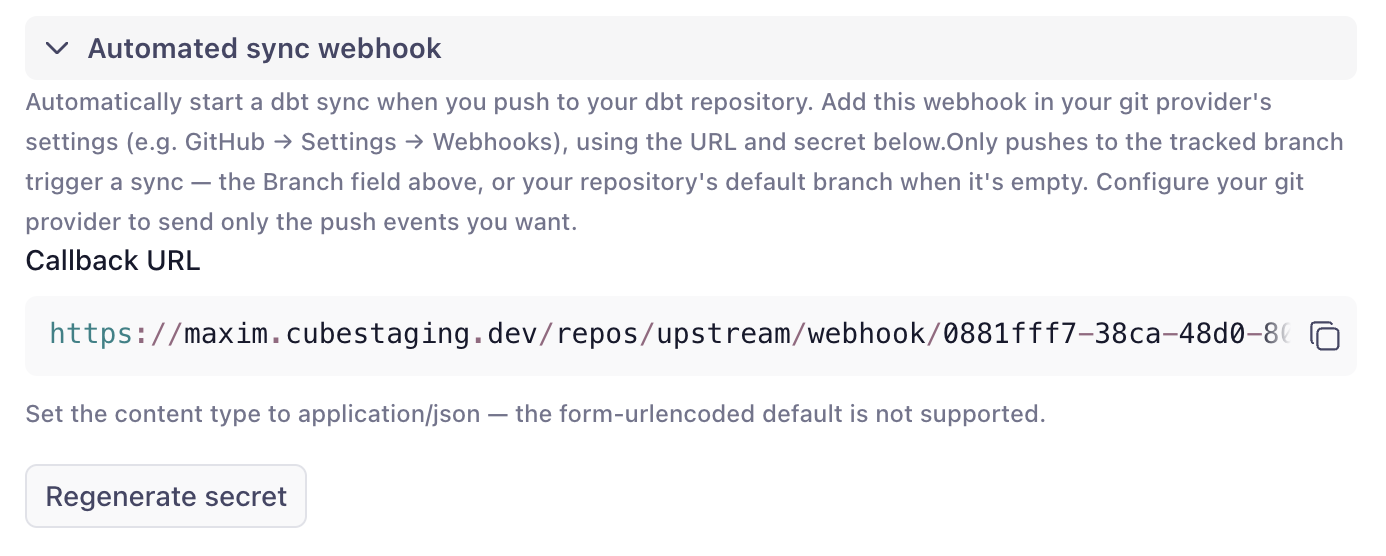
Review notifications
When an automated sync produces a branch that’s ready to review, Cube emails the recipients you configure — a comma-separated list in the settings card — with a link straight to the review. No one has to poll the UI to notice that dbt changed.What gets generated
dbt pull converts models, their columns, and their relationships. dbt metrics and semantic models are not imported. For each dbt model in your project:-
One cube is created (one
.ymlfile per model), named<name prefix><model name>with title<title prefix><model alias or name>. -
sql_tableis set to the model’s fully-qualified relation,database.schema.model(empty parts are dropped, so e.g. Postgres and Athena yieldschema.model). On Databricks, the first segment is the catalog: the value of the deployment’sCUBEJS_DB_DATABRICKS_CATALOGenvironment variable, orhive_metastoreif it isn’t set. -
Each column becomes a dimension. The dimension type is inferred from the
column’s
data_typewhere available, otherwise from the column name: - Model and column descriptions from your dbt project are carried over to the cubes and dimensions.
-
A
countmeasure is added to every cube. -
total_<column>sum measures are added for numeric columns whose names suggest an additive metric (names containingamount,price,cost,total, orvalue). -
Primary keys are detected from
id/*_idcolumns and dbtprimary_keyconstraints, and the matching dimensions are markedprimary_key. -
Joins between cubes are generated from dbt
relationshipstests and foreign-key constraints, with the relationship type (many_to_one,one_to_many, orone_to_one) inferred from the models — so the generated data model is queryable across cubes out of the box.
metricflow_time_spine and any non-model resources (sources, seeds,
snapshots, etc.) are skipped.
Each generated file begins with a header noting that it’s auto-generated and
recommending you don’t edit it by hand — see
Build on top of the generated cubes for
how to customize them instead.
Build on top of the generated cubes
Think of the resulting data model as layered. The generated cubes are the base layer, not the finished semantic layer:- The base layer — the cubes in the output path — is owned by the integration. It mirrors your dbt project and is regenerated on every pull, so treat it as read-only: any manual edits to these files are lost on the next sync.
- The customization layer is everything you build on top: hand-written cubes
that
extendsthe generated ones, and views that shape what’s exposed to consumers. This layer lives outside the output path and survives every pull.
extends merges your definitions into the generated cube, you can add
measures, joins, segments, pre-aggregations, or access control without touching
the generated files:
Re-running a pull
Pulling again refreshes the cubes to match your current dbt project:- Files for models that still exist in dbt are overwritten with freshly generated definitions.
- Files in the output path whose models are no longer in the dbt project are deleted.
- Files in the output path that correspond to a model still present in dbt are preserved — so a scoped pull (using a model selector or “Only pull marts”) will not delete the cubes for models outside that scope.
Limitations
- Supported warehouses: Snowflake, Amazon Redshift, PostgreSQL, Google BigQuery, Databricks, and Amazon Athena.
- Imports models, columns, and relationships only — not dbt metrics, semantic models, tests, or exposures.
- One-directional — Cube never pushes anything back to your dbt repository.
- No warehouse connection — a pull doesn’t trigger a
dbt run; it assumes your tables are already built. - One dbt project per deployment.
Troubleshooting
The pull dialog says the database type is unsupported
The pull dialog says the database type is unsupported
Your deployment uses a database other than Snowflake, Amazon Redshift, PostgreSQL,
Google BigQuery, Databricks, or Amazon Athena. dbt pull isn’t available for it.
The pull dialog says dbt isn't configured
The pull dialog says dbt isn't configured
The dbt connection settings are missing or incomplete on the default data source. An
account administrator can add them under Settings → Data Sources (see
Connect your dbt repository). If you’re not an
administrator, ask someone who manages the deployment to set it up.
Test connection fails
Test connection fails
The message identifies the cause:
- Authentication failed — the token is invalid, expired, or lacks read access to the repository (for HTTPS), or the deploy key isn’t registered on the repository (for SSH). Generate a new read-scoped token, or register the public deploy key shown in the settings card.
- Repository not found — check the URL; for private repos this can also mean the credential can’t see the repo.
- Unsupported protocol — use the repository’s HTTPS or SSH clone URL.
- Host unreachable / could not resolve host — check the URL; the host must be reachable over the public internet.
A pull fails partway through
A pull fails partway through
The error message describes what failed. Common causes:
- The dbt project doesn’t exist at the configured Project path (no
dbt_project.ymlthere). - A failure in the dbt project itself — the same failure you’d see running dbt locally.
The pull reports "no dbt models matched"
The pull reports "no dbt models matched"
Your Model selector and/or Only pull marts filters excluded every model. The
pull fails (rather than generating nothing and deleting files) and names the active
filters. Adjust the selector/marts folder and try again. Confirm the selector with
dbt ls --select <your selector> locally.A webhook push doesn't trigger a sync
A webhook push doesn't trigger a sync
Check that:
- The webhook is registered on the dbt repository with the callback URL and signing secret from the settings card.
- The push targets the branch configured in the dbt settings — pushes to other branches are ignored.
- The delivery isn’t a redelivery or a no-op ref change — those are de-duplicated and skipped.
The pull succeeded but Playground returns no data
The pull succeeded but Playground returns no data
dbt pull generates cube definitions that point at
schema.<model>, but it doesn’t
build the tables. Make sure your production dbt run has materialized the models
into the dbt models schema you configured, and that the schema matches.A generated cube points at the wrong table or schema
A generated cube points at the wrong table or schema
The
sql_table is derived from your dbt project and the dbt models schema
setting. Verify that dbt models schema matches where your models actually land,
and that any per-model schema/database overrides in dbt are what you expect.On Databricks, the catalog segment comes from the deployment’s
CUBEJS_DB_DATABRICKS_CATALOG environment variable and defaults to
hive_metastore. If your models live in a Unity Catalog catalog, set
CUBEJS_DB_DATABRICKS_CATALOG to that catalog so generated cubes point at it.